Prepare the fields
Complete this step in the ClickSyncr interface and save the configuration.
Campaign Monitor integration
Connect WPForms to Campaign Monitor and every form submission becomes a subscriber in the Campaign Monitor list you choose. ClickSyncr for Campaign Monitor adds a ClickSyncr Campaign Monitor…
A clear setup path
Keep the existing form and configure the destination beside the workflow you already use.
Complete this step in the ClickSyncr interface and save the configuration.
Complete this step in the ClickSyncr interface and save the configuration.
Complete this step in the ClickSyncr interface and save the configuration.
Complete this step in the ClickSyncr interface and save the configuration.
Complete this step in the ClickSyncr interface and save the configuration.
Connect WPForms to Campaign Monitor and every form submission becomes a subscriber in the Campaign Monitor list you choose. ClickSyncr for Campaign Monitor adds a ClickSyncr Campaign Monitor section in the WPForms builder settings: connect your API key once, pick a list, map your fields, save. No code and about two minutes per form.
You need three things: the ClickSyncr for Campaign Monitor plugin activated, WPForms active, and a Campaign Monitor account with permission to create an API key. The key is stored once and shared across every supported builder on the site.
Treat the key like a password. Anyone holding it can read and modify your Campaign Monitor audience.
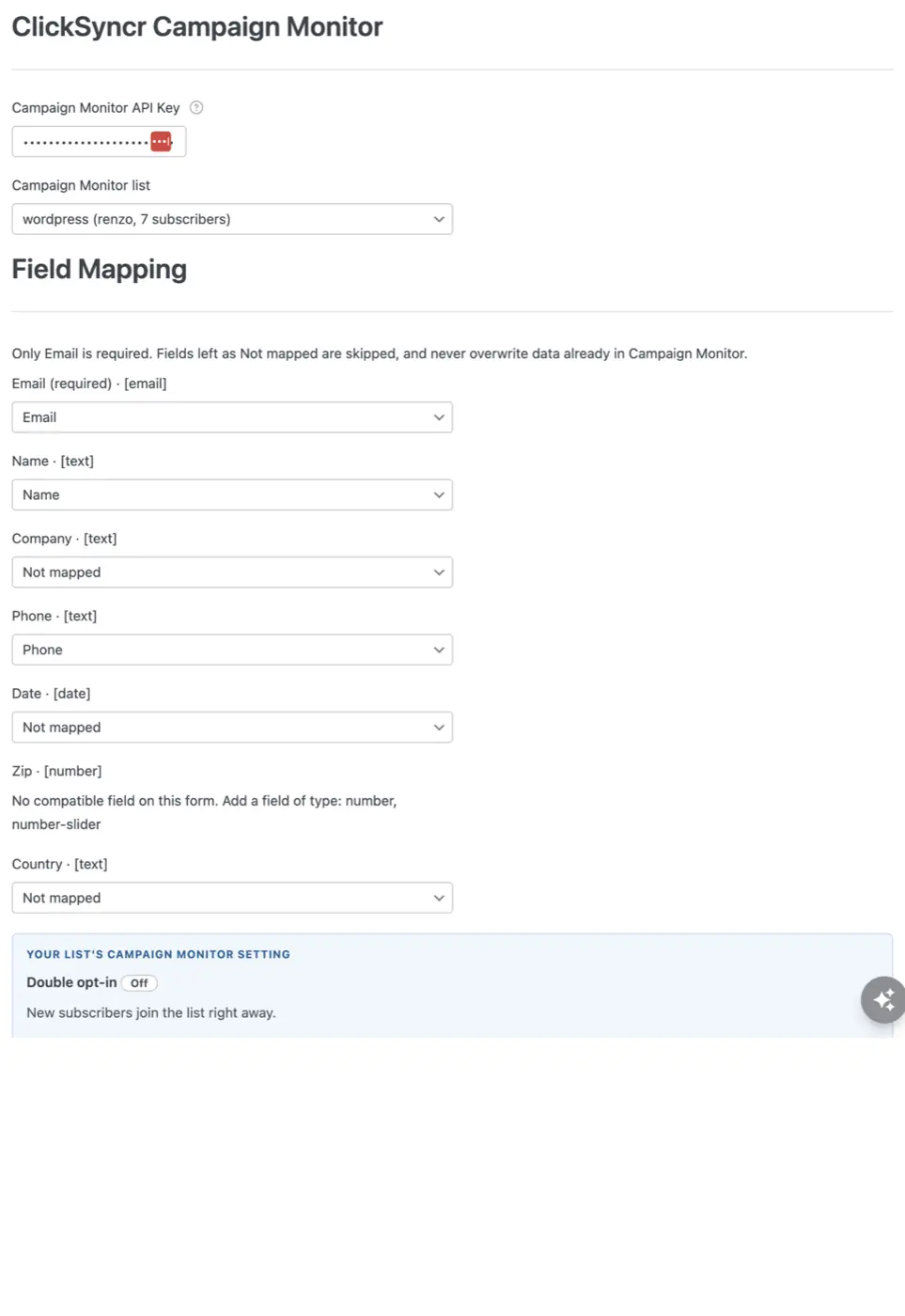
Every builder maps the same schema: Email (required), the standard Name field, and the selected list’s custom fields (phone, company and any you define), mapped by name with each field’s type shown. Fields are per list, so the mapping rows follow the list you choose. Campaign Monitor matches subscribers by email, so a repeat submission resubscribes the same person instead of creating a duplicate. An unmapped field is simply skipped and never overwrites existing data with a blank value.
Lists belong to clients in Campaign Monitor, so the list picker shows every list with its owning client and live subscriber count: useful when an agency account manages several brands. The panel also reads each list’s real confirmed opt-in setting. When it is on, Campaign Monitor emails a confirmation before the subscriber joins, and the panel says so in a banner before you save, so there are never surprises about who receives what.
Submit the form on the front end (not the admin preview) with a test address you can recognise, filling every mapped field. In Campaign Monitor, open the list and search for your test address under Subscribers. If the list uses confirmed opt-in, the subscriber appears after they click the confirmation email. Back in WordPress, the ClickSyncr entry in the admin bar shows per-form sync counts and the last error, if any: a quick pulse check without leaving the site.
| Symptom | Cause and fix |
|---|---|
| Lists don’t load after pasting the key | Copy the account API key from Account Settings → API keys in Campaign Monitor and paste it exactly. |
| The subscriber never appears | If the consent box was left unticked, or the form’s status is Not synced, nothing is sent to Campaign Monitor by design. Otherwise check the list’s confirmed opt-in setting: the subscriber joins only after clicking the confirmation email. |
| A custom field stays empty | Fields are per list. Check the mapping row and confirm the field exists on the list you selected. |
| Sync stopped working | Check the admin-bar health menu for the last error. An invalid or rotated API key is the usual cause; paste the new key in any builder and it updates everywhere. |
Yes. The ClickSyncr Campaign Monitor section works in the free WPForms Lite as well as WPForms Pro; no addon is required.
Yes. The API key is shared, but each form picks its own list and its own field map.
ClickSyncr for Campaign Monitor also connects Contact Form 7 · Gravity Forms · Ninja Forms · Fluent Forms · Formidable Forms · Forminator. Overview and features: Campaign Monitor integration for WordPress. Browse all ClickSyncr integrations.
“Campaign Monitor” is a trademark of Campaign Monitor Pty Ltd. ClickSyncr for Campaign Monitor is an independent integration and is not affiliated with, endorsed by, or sponsored by Campaign Monitor Pty Ltd.
Your next subscriber is one connection away
Install ClickSyncr, connect your platform, and publish your first tested sync in about two minutes.
Built by Renzo Johnson