Klaviyo integration

Connect your WordPress forms. Send every lead to Klaviyo.

Connect Your WordPress Forms to Klaviyo ClickSyncr for Klaviyo is a free Klaviyo integration for WordPress forms: it turns form submissions into Klaviyo profiles automatically. It works with…

your WordPress forms
Klaviyo
Direct connection supported

A clear setup path

Connect, map, test, publish.

Keep the existing form and configure the destination beside the workflow you already use.

01 / FORM

Prepare the fields

Complete this step in the ClickSyncr interface and save the configuration.

02 / API

Connect the account

Complete this step in the ClickSyncr interface and save the configuration.

03 / LIST

Choose the destination

Complete this step in the ClickSyncr interface and save the configuration.

04 / MAP

Match the fields

Complete this step in the ClickSyncr interface and save the configuration.

05 / TEST

Submit and verify

Complete this step in the ClickSyncr interface and save the configuration.

Connect Your WordPress Forms to Klaviyo

ClickSyncr for Klaviyo is a free Klaviyo integration for WordPress forms: it turns form submissions into Klaviyo profiles automatically. It works with Contact Form 7, WPForms, Gravity Forms, Ninja Forms, Fluent Forms, Formidable Forms, and Forminator: whichever builder your site uses, every submission lands in the Klaviyo list you choose, with field mapping and no code required.

Works with your form builder

ClickSyncr integrates natively with each builder, so the Klaviyo settings live where you already work. Each name links to its step-by-step setup guide:
  • Contact Form 7 + Klaviyo: a ClickSyncr Klaviyo tab appears in the Contact Form 7 editor. Pick a list, map your fields, save.
  • WPForms + Klaviyo: a ClickSyncr Klaviyo section in the WPForms builder settings. Configure the sync per form without leaving the builder.
  • Gravity Forms + Klaviyo: a native Gravity Forms feed. Add a ClickSyncr Klaviyo feed to any form, with conditional logic support from the feed framework.
  • Ninja Forms + Klaviyo: a ClickSyncr Klaviyo action in the Ninja Forms builder. Add it to a form and every submission syncs.
  • Fluent Forms + Klaviyo: a native Fluent Forms integration. Connect the key once under Integrations, then add a Klaviyo feed to any form.
  • Formidable Forms + Klaviyo: a Klaviyo form action, available in Formidable Lite as well as Pro.
  • Forminator + Klaviyo: a native Forminator application. Connect it once, then apply it to any form.

How it works

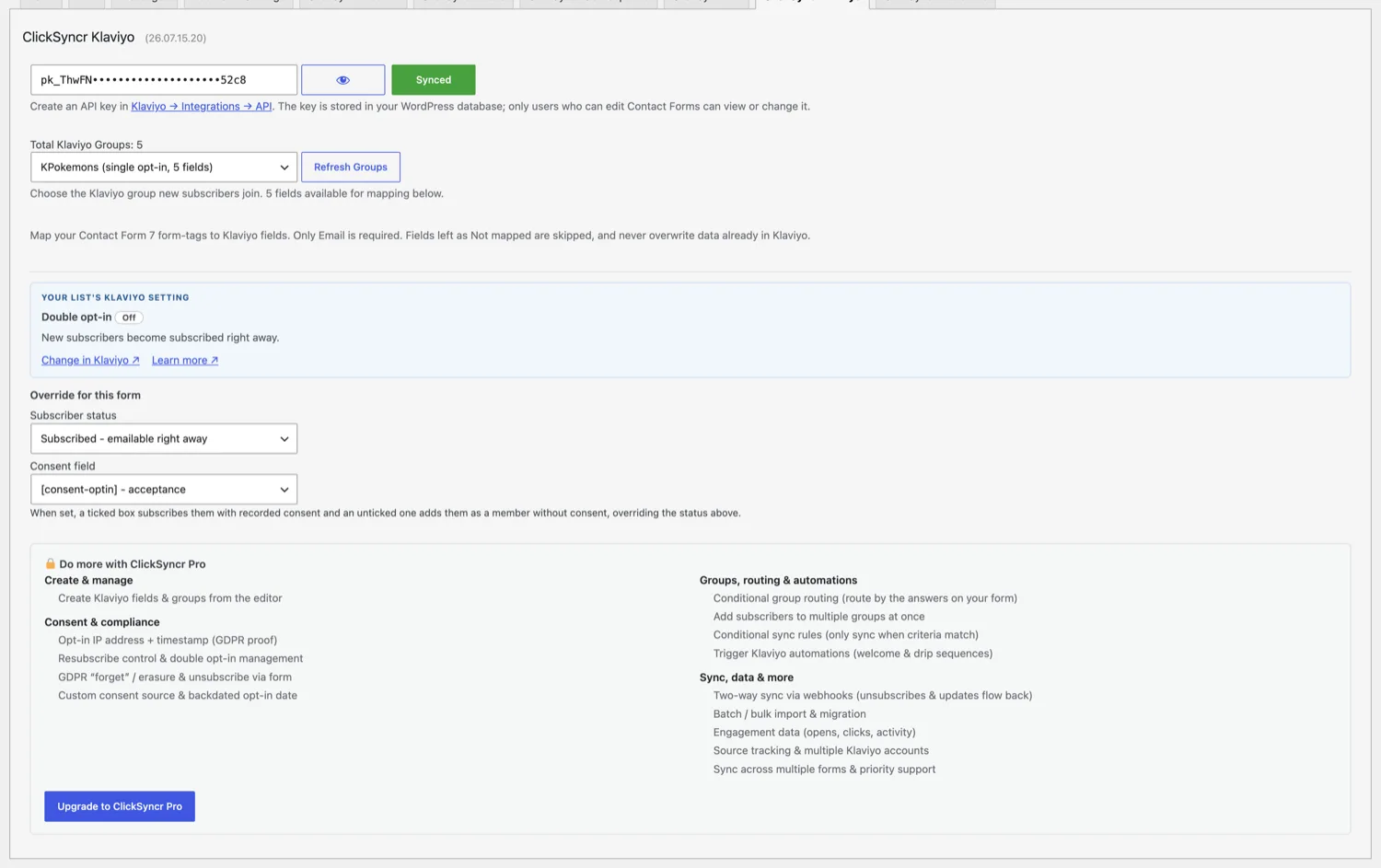
The ClickSyncr Klaviyo panel in the Contact Form 7 editor.
  1. Install ClickSyncr for Klaviyo and activate it. It detects your form builder automatically.
  2. Open your form in its builder and find the ClickSyncr Klaviyo tab, section, feed, action, or integration.
  3. Paste your Klaviyo private API key once. ClickSyncr connects to your account and loads your lists, and every builder shares the connection.
  4. Choose the Klaviyo list for this form. The picker shows each list’s real opt-in mode and field count.
  5. Map your form fields to Email, the standard profile fields, and custom properties, and save.
  6. Done. Every new submission is sent to Klaviyo as a profile.

Klaviyo integration features

  • Idempotent sync: Klaviyo matches profiles by email, so re-submissions update the existing profile instead of creating duplicates.
  • Field mapping: first name, last name, phone, organization and title go to Klaviyo’s standard fields; everything else becomes a custom property. Email is the only required mapping.
  • Consent aware: with an acceptance checkbox in your form, ticked submissions subscribe with marketing consent and unticked ones join as non-marketing members.
  • Subscriber status control: subscribe, add as member only, or defer to the list’s own single or double opt-in setting, per form.
  • One connection, seven builders: the private API key is stored once and shared across every supported form builder on the site.
  • Rate-limit aware: respects Klaviyo’s API rate limits so a busy site never silently drops submissions.
  • Debug logging: submission failures are written to WordPress debug.log when WP_DEBUG_LOG is enabled.
  • Coexists with every other ClickSyncr integration: run Klaviyo alongside Mailchimp, HubSpot, ActiveCampaign and 20+ more on the same site.

Get your Klaviyo private API key

  1. Log in to Klaviyo and go to Account → Settings → API Keys.
  2. Create a private API key with lists:read, lists:write, profiles:write and subscriptions:write access.
  3. Copy it and paste it into any ClickSyncr Klaviyo panel. One key serves the whole site, and free Klaviyo accounts work.

Treat the key like a password. Anyone holding it can read and modify your Klaviyo lists and profiles.

Which form builder should you use with Klaviyo?

Any of them. If your site already runs Contact Form 7, WPForms, Gravity Forms, Ninja Forms, Fluent Forms, Formidable Forms, or Forminator, ClickSyncr connects the forms you already have to Klaviyo: there is no reason to switch builders just to grow your list. The plugin refuses to run without a supported builder present, and the sync behaves identically on all seven.

“Klaviyo” is a trademark of its respective owner. ClickSyncr for Klaviyo is an independent integration and is not affiliated with, endorsed by, or sponsored by Klaviyo.

ClickSyncr for Klaviyo Changelog

VersionDescription

26.08.14.19

Seven form builders

The Klaviyo sync now works in seven form builders, with one shared private-key connection and per-form list choice.

Improvements (10)
  • WPForms integration: a ClickSyncr Klaviyo section in the builder settings.
  • Gravity Forms integration: a native feed add-on.
  • Ninja Forms integration: a builder action.
  • Fluent Forms integration: global connection plus per-form feeds.
  • Formidable Forms integration: a form action, in Lite as well as Pro.
  • Forminator integration: a native application integration.
  • One site-wide private API key shared across every builder and form.
  • Subscriber status control per form: subscribe with consent, member only, or the list setting.
  • Admin-bar sync health menu covering every configured form.
  • Step-by-step setup guides for every builder on clicksyncr.com.
Fixes (0)
Patches (0)

26.07.15.20

Documentation updates

Updates the plugin documentation and listing guidance.

Improvements (1)
  • Updated the plugin documentation and setup guidance.
Fixes (0)
Patches (0)

26.07.15.19

Interface improvements

Refines the ClickSyncr Klaviyo panel interface in the form editor.

Improvements (2)
  • Clearer connection and list-picker interface in the form editor.
  • Smoother field-mapping controls.
Fixes (0)
Patches (0)

26.07.15.09

Initial release

First public release of ClickSyncr for Klaviyo. Automatically sync every Contact Form 7 submission to your Klaviyo account as a profile in your chosen list, with standard profile-field mapping.

Improvements (8)
  • Connect Contact Form 7 to Klaviyo with no code.
  • Private API key connection with automatic validation for Klaviyo pk_ keys.
  • Progressive-disclosure interface that auto-loads your Klaviyo lists and profile fields.
  • Map Contact Form 7 fields to Klaviyo's standard profile schema: email, first name, last name, phone number, organization, title, locale, and external ID.
  • Two-step idempotent subscribe — profile upsert plus list assignment — that self-heals on the next submission if a step fails.
  • Cursor pagination that loads every Klaviyo list, and rate-limit awareness that honors Retry-After on 429 responses.
  • Per-form configuration so each Contact Form 7 form can sync to a different list and mapping.
  • REST API endpoints, modern ES6+ JavaScript (no jQuery), and WordPress coding standards throughout.
Fixes (0)
Patches (0)

Your next subscriber is one connection away

Connect your next form to Klaviyo.

Install ClickSyncr, connect your platform, and publish your first tested sync in about two minutes.

Built by Renzo Johnson