Campaign Monitor integration

Connect your WordPress forms. Send every lead to Campaign Monitor.

ClickSyncr for Campaign Monitor is a Campaign Monitor integration for WordPress forms: it turns form submissions into Campaign Monitor subscribers automatically. It works with Contact Form 7, WPForms,…

your WordPress forms
Campaign Monitor
Direct connection supported

A clear setup path

Connect, map, test, publish.

Keep the existing form and configure the destination beside the workflow you already use.

01 / FORM

Prepare the fields

Complete this step in the ClickSyncr interface and save the configuration.

02 / API

Connect the account

Complete this step in the ClickSyncr interface and save the configuration.

03 / LIST

Choose the destination

Complete this step in the ClickSyncr interface and save the configuration.

04 / MAP

Match the fields

Complete this step in the ClickSyncr interface and save the configuration.

05 / TEST

Submit and verify

Complete this step in the ClickSyncr interface and save the configuration.

Connect Your WordPress Forms to Campaign Monitor

ClickSyncr for Campaign Monitor is a Campaign Monitor integration for WordPress forms: it turns form submissions into Campaign Monitor subscribers automatically. It works with Contact Form 7, WPForms, Gravity Forms, Ninja Forms, Fluent Forms, Formidable Forms, and Forminator: whichever builder your site uses, every submission lands in the Campaign Monitor list you choose, with field mapping and no code required.

Works with your form builder

ClickSyncr integrates natively with each builder, so the Campaign Monitor settings live where you already work. Each name links to its step-by-step setup guide:
How it works

  1. Install ClickSyncr for Campaign Monitor and activate it. It detects your form builder automatically.
  2. Open your form in its builder and find the ClickSyncr Campaign Monitor tab, section, feed, action, or integration.
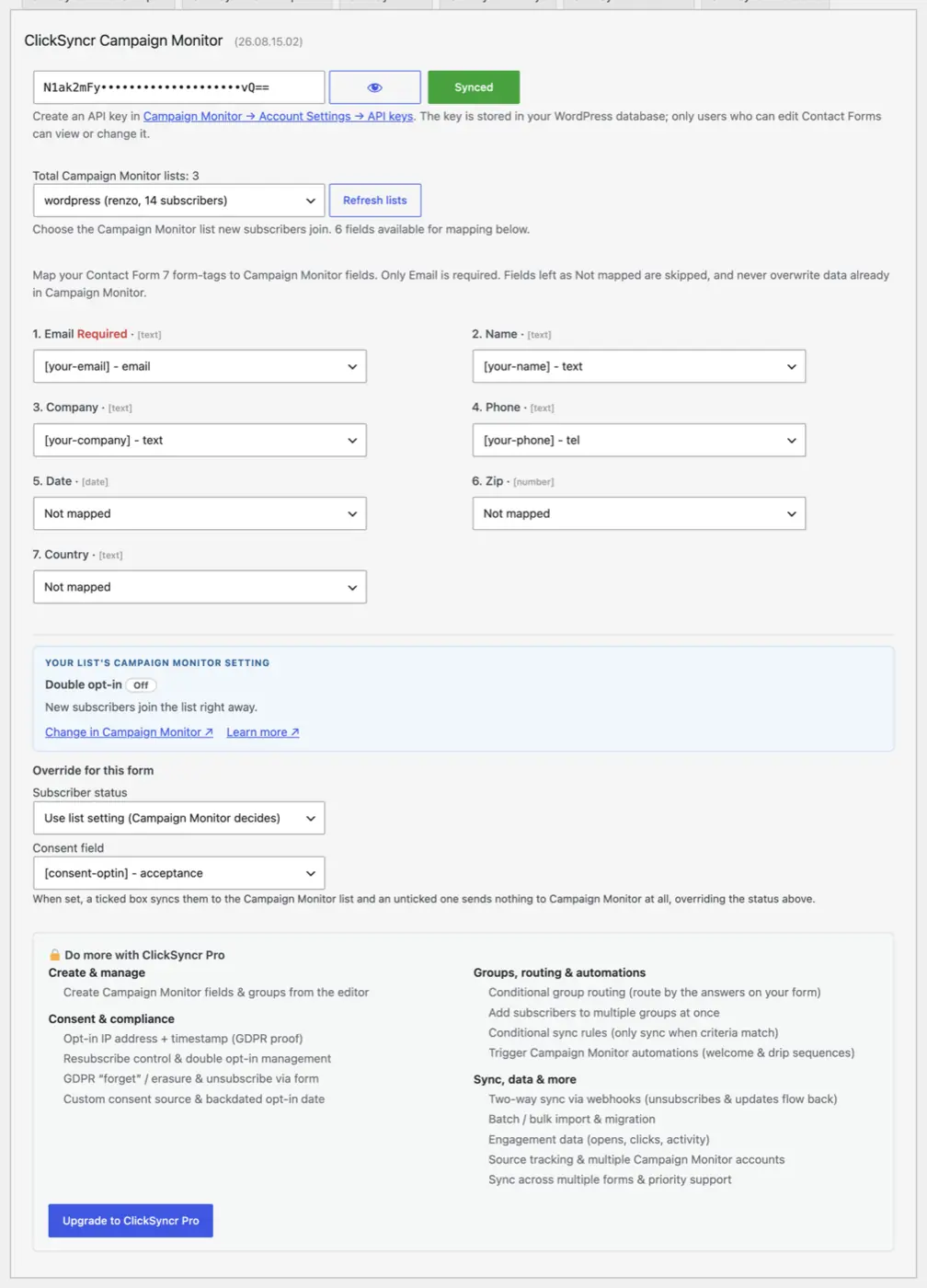
  3. Paste your Campaign Monitor account API key once. ClickSyncr connects to your account and loads your lists and their fields, and every builder shares the connection.
  4. Choose the Campaign Monitor list for this WordPress form.
  5. Map your form fields and save.
  6. Done. Every new submission is sent to Campaign Monitor as a subscriber.
The ClickSyncr Campaign Monitor panel: key connected, list selected with its client and size, fields mapped, status and consent control.

Campaign Monitor integration features

  • No duplicate subscribers: Campaign Monitor matches subscribers by email, so a repeat submission resubscribes the same person instead of creating a duplicate.
  • Field mapping: Email is the only required mapping; list fields load automatically with their types shown.
  • Client-aware list picker: every list shows its owning client and live subscriber count, so agency accounts with several brands stay unambiguous.
  • Confirmed opt-in, surfaced: the panel reads each list’s real confirmed opt-in setting and tells you before you save whether Campaign Monitor will send a confirmation email first.
  • Consent aware: Set an optional consent field (a checkbox, acceptance or radio). When a visitor leaves it unticked, nothing is sent to Campaign Monitor at all: by design, no contact record, no email. The same applies when you set the form’s status to Not synced.
  • One connection, seven builders: the API key is stored once and shared across every supported form builder on the site.
  • Sync health at a glance: an admin-bar menu shows every configured form’s sync counts and the last error, if any.
  • Coexists with every other ClickSyncr integration: run Campaign Monitor alongside Mailchimp, HubSpot, ActiveCampaign and 20+ more on the same site.

Get your Campaign Monitor API key

  1. Log in to Campaign Monitor (login.createsend.com) and open Account Settings → API keys.
  2. Reveal the account API key and copy it.
  3. Paste it into any ClickSyncr Campaign Monitor panel. One key serves the whole site: once one builder saves it, every other builder reuses the connection automatically.

Treat the key like a password. Anyone holding it can read and modify your Campaign Monitor audience.

Which form builder should you use with Campaign Monitor?

Any of them. If your site already runs Contact Form 7, WPForms, Gravity Forms, Ninja Forms, Fluent Forms, Formidable Forms, or Forminator, ClickSyncr connects the forms you already have to Campaign Monitor: there is no reason to switch builders just to grow your list. The plugin only loads the integrations for builders you actually have active, and the sync behaves identically on all seven.

“Campaign Monitor” is a trademark of Campaign Monitor Pty Ltd. ClickSyncr for Campaign Monitor is an independent integration and is not affiliated with, endorsed by, or sponsored by Campaign Monitor Pty Ltd.

ClickSyncr for Campaign Monitor Changelog

VersionDescription

26.09.05.11

Assets and debug tools

Improved assets loading and added debug tools.

Improvements (2)
  • Improved assets loading
  • Added debug tools
Fixes (0)
Patches (0)

26.09.04.18

The form panel as cards

The Campaign Monitor panel on every form is redesigned around cards: groups and fields as tiles, one explanation per setting in Campaign Monitor's own words, and the Pro rows on the same panel when ClickSyncr Pro is licensed.

Improvements (6)
  • The panel is five cards: API key, lists for every subscriber, field mapping, subscription and consent, test and inspect.
  • The confirmation and status rows describe what Campaign Monitor actually does, in its own terms.
  • Field mapping appears as tiles; a mapping to a field no longer on the form is flagged and counted as unmapped.
  • The stored API key stays masked and can be revealed with the eye button.
  • With ClickSyncr Pro licensed, the panel adds groups by answer, a consent gate, and the tools: find a subscriber, import a list, create a field.
  • Every mention of ClickSyncr Pro on the panel, and the Documentation and Support links in the admin bar, link to clicksyncr.com.
Fixes (4)
  • Every select on the panel carries a default, so Contact Form 7 no longer warns about unsaved changes on a freshly opened form.
  • WPForms checkbox answers reach the sync as a list instead of one joined string.
  • Forminator now passes the submitted answers to the sync.
  • Gravity Forms and Fluent Forms feeds keep their native conditional logic.
Patches (0)

26.08.28.12

First release on WordPress.org

ClickSyncr Form Sync for Campaign Monitor syncs form submissions to a Campaign Monitor list from seven form builders. One API key covers them all, and each form picks its own list.

Improvements (6)
  • Works in Contact Form 7, WPForms, Gravity Forms, Ninja Forms, Fluent Forms, Formidable Forms, and Forminator.
  • Every client in your account is gathered into one dropdown, and each list shows the client it belongs to and how many active subscribers it has.
  • Map any form field to your list's Campaign Monitor custom fields, and each field's own type filters the form fields offered for it.
  • Add subscribers as Active, or defer to your Campaign Monitor list's own confirmed opt-in setting, per form.
  • A per-form consent field decides whether a submission syncs at all.
  • An admin-bar menu shows every form's sync counts and the last error, if any.
Fixes (0)
Patches (0)

Your next subscriber is one connection away

Connect your next form to Campaign Monitor.

Install ClickSyncr, connect your platform, and publish your first tested sync in about two minutes.

Built by Renzo Johnson